Hi Pete,
Thanks for the prompt and detailed reply. You the man!
I'm learning about all of this connectivity stuff for the first time so bear with me. I looked into my first hop, 10.xxx.xxx.xxx, and according to this
http://www.faqs.org/rfcs/rfc1918.htmlweb page the 10 IP's are for private usage like 192.168.xxx.xxx. Perhaps most knew this, but it was news to me. I checked my cable modem (a SB4220) and the closest thing I found to a 10.xxx.xxx.xxx IP address was a "HFC IP Address with a 10.xxx.xxx.xxx. address. This was not the same one that's in Hop 1 of my pingplotter diagram, though.
I also checked forums and perhaps it might be a "CTMS", whatever that is. Someone posted this on broadbandreports.com when someone was trying to their HFC IP Address.
"It was the IP address of the CMTS. The reason it now times out is Comcast has set it to ignore ICMP, which is quite common. Your modem's IP will never show in a traceroute since it functions as a transparent bridge."
Anyway, about my config ... I do have a router, but I eliminated that from the system and used my desktop to ping without the router. Removing the laptop/router does not seem to make a difference regarding packet loss. I do notice, however, that my average pings from the laptop are in the 20s while average pings from my desktop are in the 70s to the same place. Not sure what to make of that either.
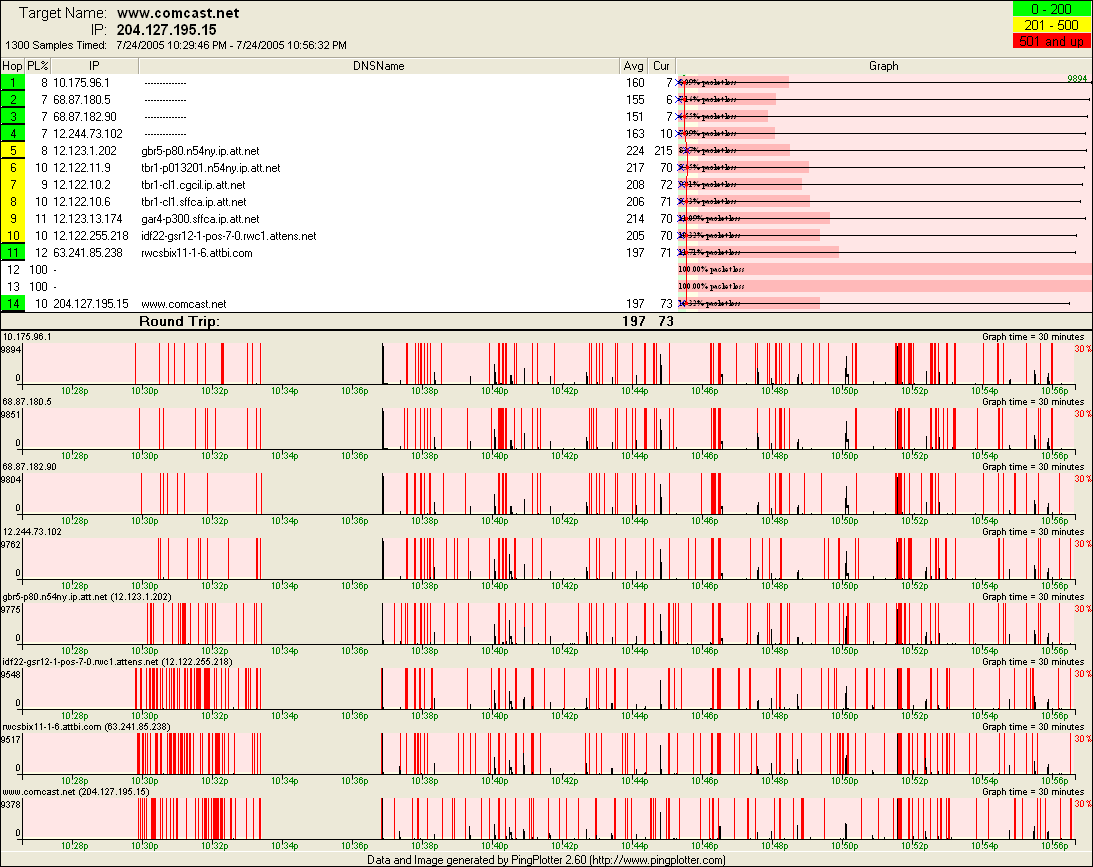
Tonight, my pingplotter results appear this way (much shorter time):




 Previous Topic
 Index
Index
